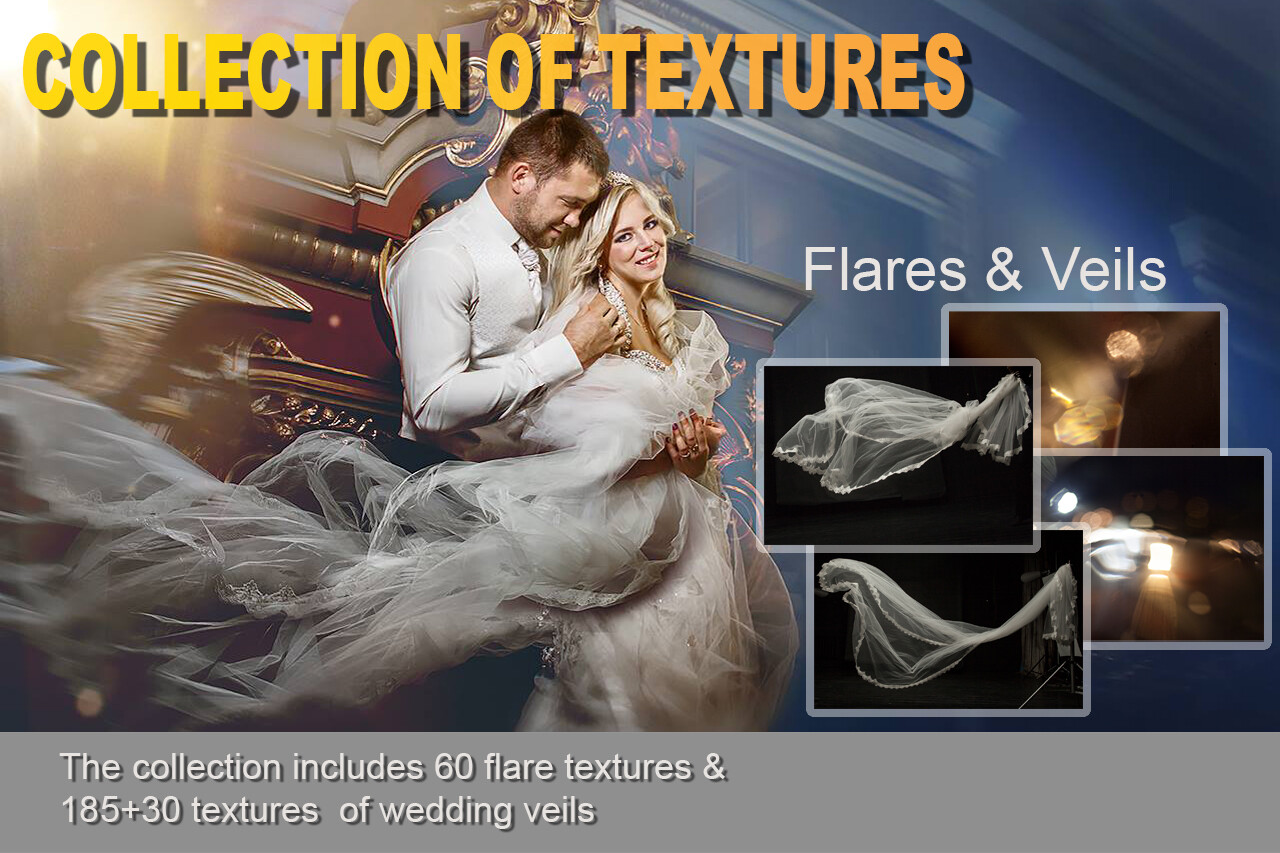
Collection of textures: Flares&veils
SKU 00003
$25.00
Collection of textures: Flares&veils
Product Details
✔ Collection of wedding veils for Photoshop
✔ Collection of light flares
✔ 30-day money-back guarantee
Collection of Textures: Flares & Veils
The same overlays I use in my own wedding and children's fine art images.
Two collections in one pack: wedding veils to add a soft, flowing veil to a bride, and light flares to bring warm, glowing light into your photos. These are the real working files from my fine art workflow — the ones you see in my lessons.
Wedding Veils Collection
A collection of veil textures for wedding photography. Add a light, transparent veil to a bride who wasn’t wearing one, make an existing veil longer and more dramatic, or create a soft, romantic layer of fabric in the frame. A veil adds lightness, movement and a dreamy, painterly mood to a wedding image.
Flares Collection
A collection of light flares I use when creating children’s and wedding images. Add warm sunlight, a gentle glow or a soft light accent — the kind of light that makes an image feel alive and atmospheric.
How to use
- Open the texture in Photoshop and drag it onto your photo as a new layer
- For flares, set the blending mode to Screen — the dark background disappears and only the light remains
- Transform, rotate and resize the overlay to fit your image
- Use a layer mask to blend the edges and control where the effect appears
- Adjust color and brightness with Hue/Saturation or Curves to match the light of your photo
Want to see these textures in action? My video lessons “How to Add a Wedding Veil in Photoshop” and “Soft & Dreamy Effect” show the full process step by step.
What's included
- Wedding Veils Collection (.zip, about 534 MB)
- Flares Collection (.zip, about 683 MB)
- Step-by-step "Read Me First" guide
- Works with: Adobe Photoshop
Download Information
This product is a digital download only.
Your download links will appear right after purchase and will also be sent to your email. Links stay active for 6 months — please download and save the files to your computer.
Total download size: approximately 1.2 GB (veils 534 MB + flares 683 MB). Please download on a computer with a stable internet connection.
30-day money-back guarantee. Try it risk-free.
Want the complete system?
These textures are part of my fine art workflow, taught step by step in the Fine Art Photoshop Complete Course — 12 lessons, 20 layered PSD files and over 12 hours of real editing.
You May Also Like

For Wedding Photographers

Wedding Bundle — 5 Lessons
Wedding Bundle — 5 Lessons
Downloadable fine art Photoshop wedding editing lessons with layered PSD files. Learn real depth, light, and elegant color — not presets. • 30-day money-back guarantee
$129.00
Display prices in:USD