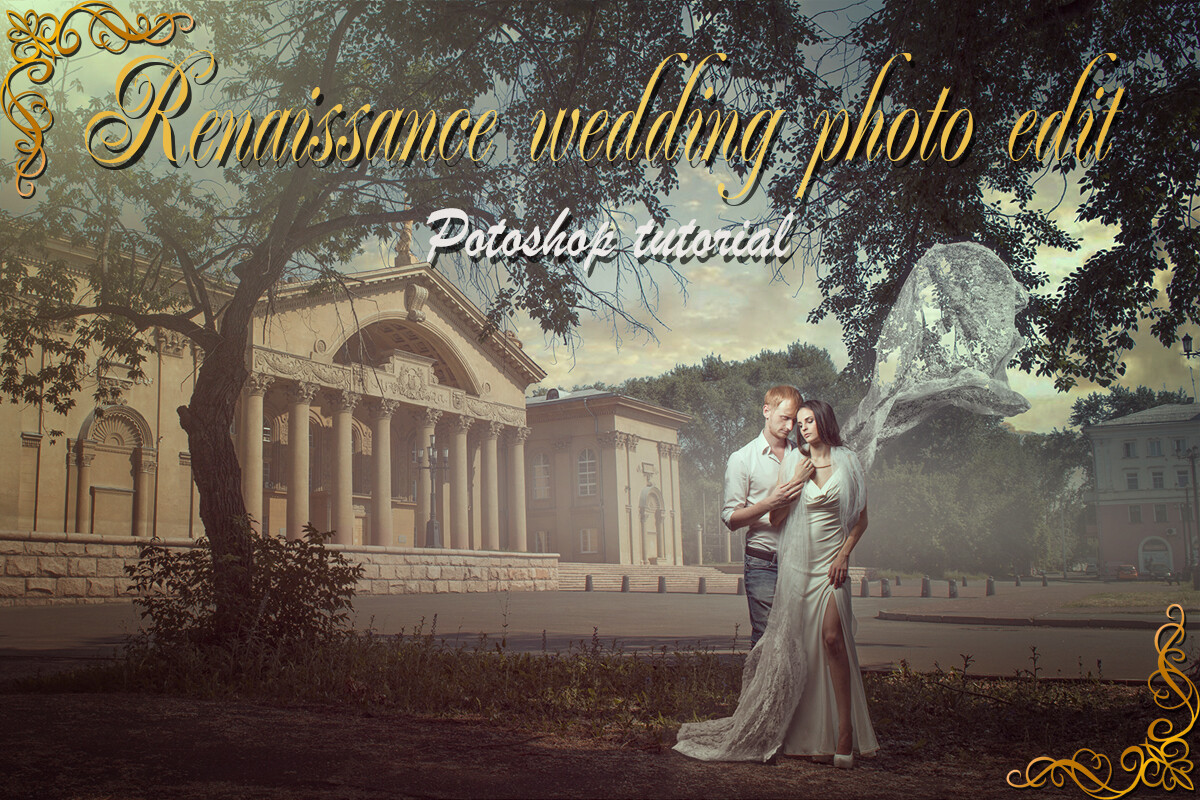
Video_lesson "Renaissance wedding photo edit"
SKU 00008
$50.00
Video_lesson "Renaissance wedding photo edit"
Product Details
✔ Full step-by-step editing workflow — 55 minutes
✔ Layered Photoshop file + painterly texture
✔ 30-day money-back guarantee
Video Lesson: Renaissance Wedding Photo Edit
Turn a wedding photo into a timeless image inspired by the painters of the Renaissance.
Learn the exact workflow behind this photo — from the original shot to a painterly wedding portrait. This is not a preset. You see every layer, every step, and why it works.
Why this image looks like a painting
Renaissance masters created depth not only with line, but with air. Distant forms soften and fade, edges melt into shadow, and the colors stay warm, calm and noble. In this lesson we bring the same principles into a wedding photograph: painterly toning, a delicate veil, and the soft, smoky transitions of the sfumato technique that give the image real depth.
You will also get my original wedding toning — a color look you can use as a starting point for your own wedding work.
Lesson Preview
Watch a short teaser showing the editing approach used in this lesson.
What you will learn
- how to tone a photo so it resembles the paintings of Renaissance masters
- how to add a realistic, transparent wedding veil
- how to create aerial perspective and depth with the sfumato technique
- how to add a painterly texture to the image
- how to build an original, elegant wedding color look
What's included
- 55-minute complete editing workflow video (MP4, 1080p)
- Layered Photoshop file — the image shown above, with all layers and further explanations
- Texture file used for the painterly look
- Step-by-step "Read Me First" guide
- Editing software: Adobe Photoshop
Please note: the video has no voice-over. Each step is explained with on-screen text captions, with music in the background.
Open the Photoshop file and follow every step layer by layer.
Download Information
This product is a digital download only.
Your download links will appear right after purchase and will also be sent to your email. Links stay active for 6 months — please download and save the files to your computer.
Total download size: approximately 1.4 GB (video 1.21 GB + Photoshop files 170 MB). Please download on a computer with a stable internet connection.
30-day money-back guarantee. Try it risk-free.
Want the complete system?
This lesson is one part of the Fine Art Photoshop Complete Course — 12 lessons, 20 layered PSD files and over 12 hours of real editing.
You May Also Like
BLACK FRIDAY −50%
Complete Photoshop Editing Bundle — 12 Lessons
Complete Photoshop Editing Bundle — 12 Lessons
🔥 BLACK FRIDAY — $100 with code FINEART50 • 12 Photoshop video lessons • 20 layered PSD files • Brushes, actions & textures • Keep forever • 30-day money-back guarantee
$200.00
For Wedding Photographers

Wedding Bundle — 5 Lessons
Wedding Bundle — 5 Lessons
Downloadable fine art Photoshop wedding editing lessons with layered PSD files. Learn real depth, light, and elegant color — not presets. • 30-day money-back guarantee
$129.00
Display prices in:USD